Multi Level ASP.NET Menu with CSS Friendly Control Adapters (The Source Code!) Part 6
Friday 27 March 2009 @ 12:40 pm


I always intended to put the source code for this project online, however I just kept not getting around to it.  In this article, I’m attaching a Visual Studio 2008 Solution that includes both the modified CSS Friendly Control Adapter as well as a sample application that demonstrates the technique in this series.  I’m actually using the Code Camp CSS since that is the site that this solution was written for.  I’ve created a much abbreviated version of the Code Camp Site Project for this demonstration.  Below is the source code (finally).

Visual Studio 2008 Solution CSSFriendlyCustomMenu

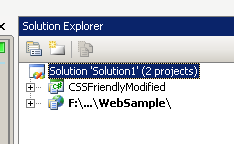
The solution is load out as follows:
image

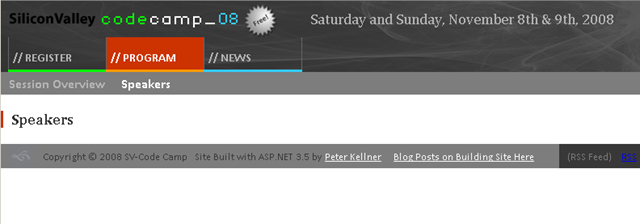
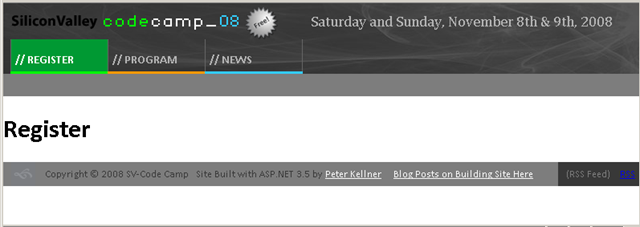
There are two projects (actually, one class library and a web site).  The class library really is just the CSS Friendly Controls library with small modifications to the menu class.  The WebSample web project is just a stripped down version of the code camp site to demonstrate the techniques used.  When you run the web site, you should see results like the following.
image


image

Notice that when the speakers page is shown, the Program menu stays highlighted.  

And, the sitemap is as follows:

   1: <siteMap xmlns="http://schemas.microsoft.com/AspNet/SiteMap-File-1.0" >
   2:   <siteMapNode url="Default.aspx" title="HOME"  description="Silicon Valley CodeCamp 08">
   3:     <siteMapNode url="Register.aspx" title="REGISTER"  description=""  />
   4:     <siteMapNode url="Program.aspx" title="PROGRAM"  description="">
   5:       <siteMapNode url="SessionsOverview.aspx" title="Session Overview"  description="Session Overview" />
   6:       <siteMapNode url="Speakers.aspx" title="Speakers"  description="" />
   7:     </siteMapNode>
   8:     <siteMapNode url="News.aspx" title="NEWS"  description="" />
   9:   </siteMapNode>
  10: </siteMap>

That’s it!

Good luck with this.


14 Responses to “Multi Level ASP.NET Menu with CSS Friendly Control Adapters (The Source Code!) Part 6”

  1. Mark Says:

    Peter,

    I downloaded your code and was able to get it to work fine. Now I’m attempting to adapt your code to work with the SqlSiteMapProvider instead of the XmlSiteMapProvider. I’m able to display the Parent menu with no problem, however the sub menu displays the same submenu items for every parent, it does not change when I click on a different parent. I’m having a hard time figuring out why this is happening. I was wondering if you or any one else reading this might have any suggestions.

    Thanks,

    -MARK-
    putrtek@gmail.com

  2. Bert Vissers Says:

    Peter,

    I downloaded this sample project but it still generates tables for me. Am i doing something wrong?
    I am really interested in CSSFriendlyModified.dll!
    Hope someone can help me out!

    Keep up the good work!
    Bert

  3. admin Says:

    not sure what you mean generates tables. did you download it and just try to a rebuild all?

  4. Caleb Says:

    So I’m trying to figure out how you created css-class for each element and it seems to be in your CSSFriendlyModified.dll Can you fill me in on how you edited the dll?

  5. admin Says:

    the source is referenced at the top of the post. Feel free to download it and you can see what is in the dll and make your own changes.

  6. ravi Says:

    I tried runing your code it generates tables for menu not list am i doing something wrong???? I’m using VS 2008
    This is what i see.


    // REGISTER


    // PROGRAM


    // NEWS

  7. Yusuf Says:

    Hi i have used this code on sharepoint it work perfectly well except that it affects all the masterpages including application.master, is there a way of making it affect only one masterpage?

    thanks

  8. rtpHarry Says:

    This sample doesnt seem to fulfil all the design aims laid out in tutorial 2.

    I got this sample and experienced the same thing – the menus are laid out in tables.

    I tried disabling the CssFriendlyAdapters and it seems that it is running and cleaning up the table code a whole bunch but not doing the ul/li combo.

    To check if this was a sample issue or not I went to the live site listed below and it also is displaying the menu in tables.

    http://www.siliconvalley-codecamp.com/

    Did you decide not to implement the tables code in the end?

  9. rtpHarry Says:

    tables replacement code I mean…

  10. rtpHarry Says:

    FIX FOR MENUS BEING RENDERED AS TABLES
    To those having trouble with the menu still being rendered as tables the fix is pretty easy.

    Here is a quick rundown:

    1/ Open MenuAdapter.cs in the CssFriendlyModified project
    2/ line 194 – replace table with ul
    3/ lines 203-206 – comment out
    4/ line 225 – comment out
    5/ line 226 – replace table with ul
    6/ line 236 – replace td with li
    7/ line 366 – replace td with li

    Thats it. If this gets out of sync in the future the basic theory is:

    find anything that is table and replace with ul.

    anything thats tr comment it out

    anything thats td replace with li

  11. rtpHarry Says:

    I think I also just found a bug on Line 66 of MenuAdapter.cs:

    filePath = folderPath.EndsWith(“/”) ? folderPath + “MenuAdapter.js” : folderPath + “/TreeViewAdapter.js”;

    should be

    filePath = folderPath.EndsWith(“/”) ? folderPath + “MenuAdapter.js” : folderPath + “/MenuAdapter.js”;

  12. admin Says:

    I did use tables because for some browser our css designer said he wanted tables. As rtpHarry says above, it could just have been lists.

  13. doc Says:

    i’m new to asp.net

    is it possible that the menu could be configured such that when the mouse hovers over the top the level the second levl becomes visible and can be navigated.

    the practicalities of this is avoids going to the top level page to get to a wanted second level page

    thanks

  14. Mathias Says:

    Hi Peter,
    Thank you for this sample, which is awesome and was a huge time-saver! There may be a reason why you organized the MasterPage this way, but one thing I modified in your code is the following: rather that have multiple datasources corresponding to each sub-section of the SiteMap, I added the sub-menu in the MasterPage, and hooked it up to a single data source, with a StartingNodeOffset of 1. As a result, there is no need to add code for the sub-menu in the pages – everything is in the MasterPage. I posted my modified MasterPage here

Leave a Reply