Article Series
Introduction
This article shows how to create a modal windows (not a popup) that displays a login windows (asking for username and password) in the middle of whatever asp.net page you are viewing. It uses the Telerik Modal Radwindow control. At the end of a successful login, the login dialog redirects the web user to some page designated by the author. It requires no Javascript programming by the programmer. Just simple method calls in the asp.net page.
How it Looks to the Web User
When the user press the login button in the upper right corner of the Silicon Valley Code Camp web site, below is the screen they see.
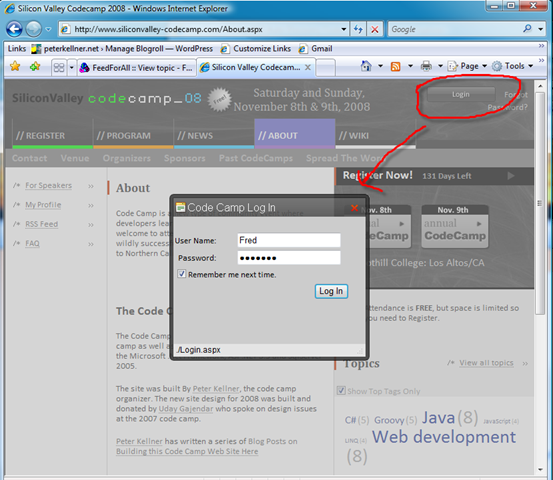
Notice that the screen behind actually fades out and is not able to be clicked by the web user.
The Method Behind Creating the Modal Window
OK, so there is a little bit of javascript you need to add to your page. Basically, what you do is in your master page, around where you have your login control, you put the following code into your aspx page.
1: <asp:ScriptManager ID="ScriptManager1" runat="server" EnablePartialRendering="true" />
2: <table class="headBar" cellpadding="0" cellspacing="0">
3: <tr>
4: <td>
5: <div class="headLogo">
6: <asp:HyperLink ID="HomeLink" runat="server" NavigateUrl="Default.aspx">
7: <asp:Image ID="HeadLogo" SkinID="ImageLogo" AlternateText="Silicon Valley codecamp_08"
8: runat="server" />
9: </asp:HyperLink>
10:
11:
12:
13: </div>
14: </td>
15: <td valign="middle">
16: <span class="headDate">Saturday and Sunday, November 8th & 9th, 2008</span>
17: </td>
18: <td align="right">
19: <div class="headLogin">
20: <div>
21:
22: <script type="text/javascript">
23: //<![CDATA[
24: //show the window
25: function showDialog()
26: {
27: //Force reload in order to guarantee that the onload event handler
28: // of the dialog which configures it executes on every show.
29: var oWnd = window.radopen(null, "DialogWindow");
30: oWnd.setUrl(oWnd.get_navigateUrl());
31: }
32:
33:
34: // Called when a window is being closed. (force refresh)
35: function OnClientclose(radWindow)
36: {
37: window.location.href = "News.aspx";
38: }
39: //]]>
40: </script>
41:
42: <asp:ImageButton ID="IDLoginButton" SkinID="ButtonLogin"
43: OnClientClick="showDialog();return false;"
44: runat="server" />
45: <asp:LoginStatus ID="IDLoginStatus1" runat="server" />
46: <asp:LoginName runat="server" ID="IDLoginName1" />
47: <telerik:RadWindowManager ID="Singleton" runat="server">
48: <Windows>
49: <telerik:RadWindow ID="DialogWindow" Behaviors="Close"
50: ReloadOnShow="true" OnClientClose="OnClientclose"
51: BackColor="Gray" Modal="true" runat="server" Height="250"
52: NavigateUrl="./Login.aspx">
53: </telerik:RadWindow>
54: </Windows>
55: </telerik:RadWindowManager>
56:
57: <asp:HyperLink ID="HyperLinkForgotChangePassword" runat="server"
58: NavigateUrl="~/PasswordIssues.aspx" Text="Forgot Password?" ></asp:HyperLink>
59:
60: </div>
61:
62: </div>
63: </td>
64: </tr>
Line 22 to 40 shows the javascript. Basically, you are calling the Telerik window.radopen method which is associated with the tag on line 49. It automatically navigates to the login.aspx page which is referenced in line 52. When the page closes, the javascript on line 37 tells the browser to redirect to the News.aspx page. The reason I do this is because if you don't change pages, I've found the the login cookie is not set (Authorization cookie). When this happens, even though the person is logged in, they do not see that they are until a page refresh happens. Very confusing to the user.
Conclusions
That is really all this is to adding a windows that displays in the middle of your page. It's so much nicer than having to send the user to a separate page to login. They can see where they are as they are logging in. I hope this helps you. I find it a very useful technique I can use in lots of web sites.