Three Part Series
(Part 1)
REST can be a very loaded term that brings up lots of discussions of what it means. Just to mention a few sites that define it take a look at this list:
- http://kellabyte.com/2011/09/04/clarifying-rest/
- http://roy.gbiv.com/untangled/2008/rest-apis-must-be-hypertext-driven
- http://stackoverflow.com/questions/3821663/querystring-in-rest-resource-url
What is abundantly clear is there is not one clear concise explanation. That said, I’m going to try and explain how to implement a Microsoft WebAPI REST controller that is written with Microsoft Visual Studio 2012.
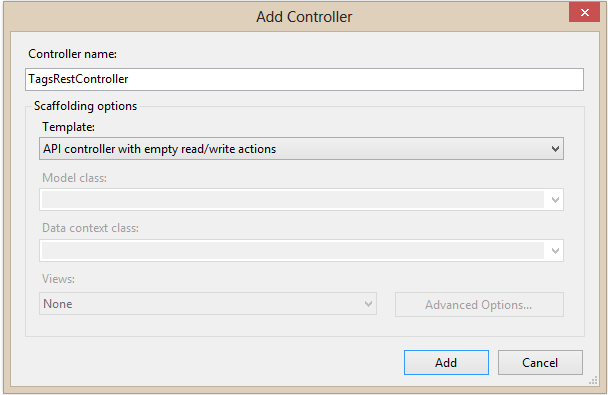
First, you need to create the WebAPI controller. I created a separate directory called “api” in my VS project for this purpose. The dialog comes up as follows: (I chose “API controller with empty read/write actions” and renamed it to be TagsRest Controller. My default url will now be http://mywebsite.com/api/TagsRest.
By default, the following controller class is made for me.
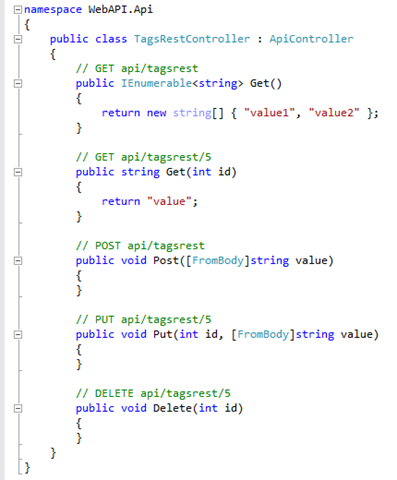
Surprising, I’m going to end the post here because we are really done. There are empty methods, which is OK because I did not mean to define an implementation with this post, just show how to create a WebAPI REST controller which I’ve done.
In the next post, I’ll show how to create a simple Sencha ExtJS application that consumes this REST service.