Understanding React’s useEffectEvent: A Complete Guide to Solving Stale Closures
TL;DR
useEffectEvent lets you read the latest props/state inside an Effect without adding them to the dependency array. This means the Effect won’t re-run when those values change. Jump to the first example.
The Core Problem
Here’s the situation: you have a useEffect that sets up something expensive—a WebSocket connection, an interval timer, a subscription. Inside that setup, your callback needs to read some state. But you don’t want changes to that state to tear down and rebuild your connection.
The tension:
- If you include the state in the dependency array → Effect re-runs, connection restarts (bad)
- If you exclude the state from dependencies → callback sees stale value (also bad)
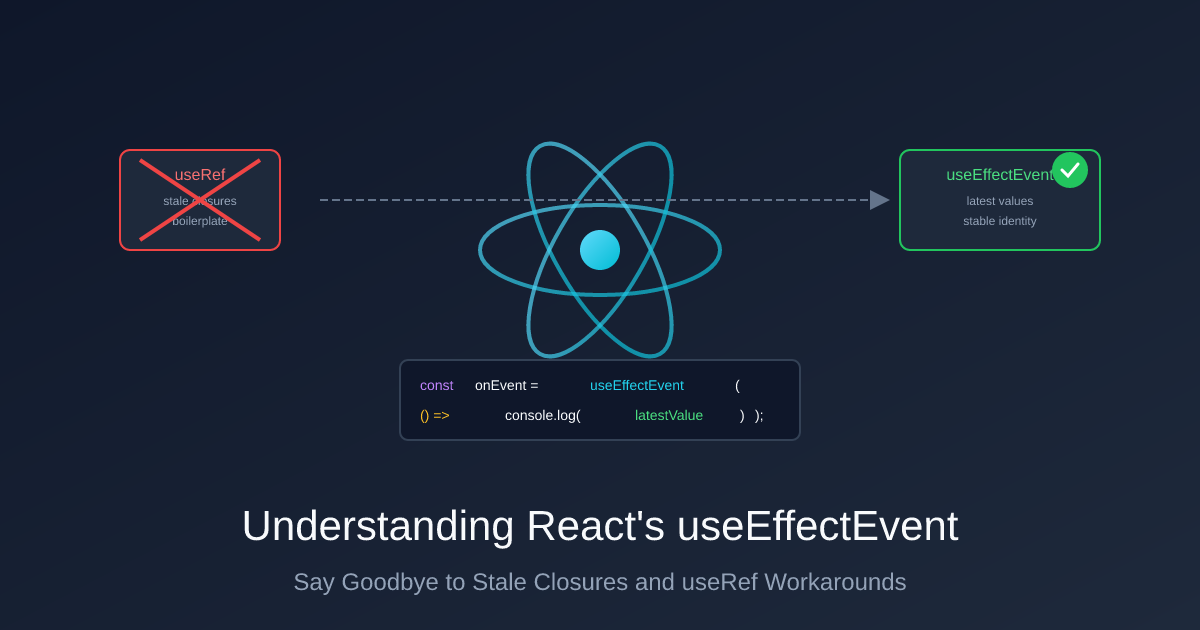
useEffectEvent solves this. It gives you a function that always reads the latest values when called, but isn’t treated as a reactive dependency.
Example 1: Chat Room Connection
Let’s build a chat component. When a message arrives, we want to play a sound—but only if the user hasn’t muted notifications.
The Broken Version (Stale Closure)
import { useEffect, useState } from "react";

function ChatRoom({ roomId }: { roomId: string }) {
  const [isMuted, setIsMuted] = useState(false);

  useEffect(() => {
    const connection = connectToRoom(roomId);

    connection.on("message", (message: string) => {
      // BUG: This captures the initial value of isMuted
      // It will NEVER see updates when the user toggles the checkbox!
      if (!isMuted) {
        playSound();
      }
    });

    return () => connection.disconnect();
  }, [roomId]); // ❌ isMuted is missing - callback sees stale value!

  return (
    <div>
      <h1>Chat Room: {roomId}</h1>
      <label>
        <input
          type="checkbox"
          checked={isMuted}
          onChange={(e) => setIsMuted(e.target.checked)}
        />
        Mute notifications
      </label>
    </div>
  );
}
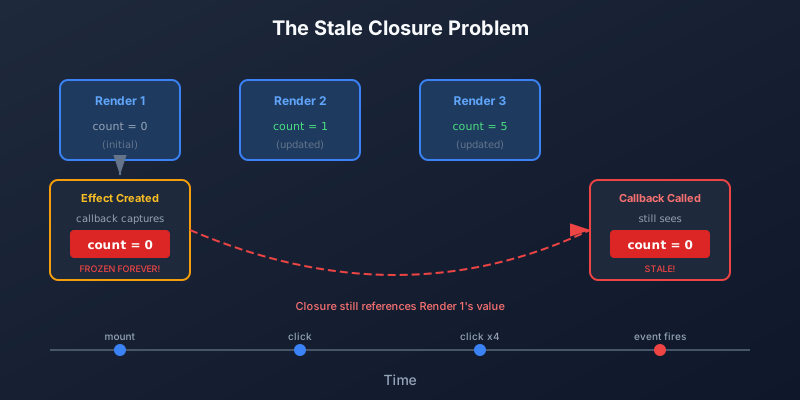
What goes wrong: The callback captures isMuted when the Effect first runs. User toggles mute? The callback still sees the old value. The closure is stale.
The “Fix” That Creates a New Problem
You might think: “Just add isMuted to the dependency array!”
useEffect(() => {
  const connection = connectToRoom(roomId);

  connection.on("message", (message: string) => {
    if (!isMuted) {
      playSound();
    }
  });

  return () => connection.disconnect();
}, [roomId, isMuted]); // ❌ Now isMuted triggers reconnection!
Now the callback sees the latest value… but every time isMuted changes:
- React runs the cleanup function →
connection.disconnect() - React runs the Effect again →
connectToRoom(roomId) - New message handler is registered
Toggling a mute checkbox causes a chat reconnection! Messages might be missed during reconnection. The server sees connection churn. It’s wasteful and broken.
The Solution: useEffectEvent
import { useEffect, useState, useEffectEvent } from "react";

function ChatRoom({ roomId }: { roomId: string }) {
  const [isMuted, setIsMuted] = useState(false);

  // Create an Effect Event - reads latest isMuted when called
  const onMessage = useEffectEvent((message: string) => {
    if (!isMuted) {
      playSound();
    }
  });

  useEffect(() => {
    const connection = connectToRoom(roomId);
    connection.on("message", onMessage);
    return () => connection.disconnect();
  }, [roomId]); // ✅ Only roomId triggers reconnection

  return (
    <div>
      <h1>Chat Room: {roomId}</h1>
      <label>
        <input
          type="checkbox"
          checked={isMuted}
          onChange={(e) => setIsMuted(e.target.checked)}
        />
        Mute notifications
      </label>
    </div>
  );
}
What happens now:
- Change
roomId→ reconnect (correct!) - Toggle
isMuted→ nothing happens to connection - Message arrives →
onMessagechecks currentisMutedvalue
The Effect only cares about roomId. The onMessage function reads isMuted when called, getting whatever the current value is at that moment.
Example 2: REST Polling Dashboard
Here’s another common scenario: a dashboard that polls an API every 10 seconds. The request includes a filter option that the user can toggle.
The Broken Version (Timer Resets)
import { useEffect, useState } from "react";

function Dashboard({ teamId }: { teamId: string }) {
  const [includeArchived, setIncludeArchived] = useState(false);
  const [data, setData] = useState(null);

  useEffect(() => {
    const fetchData = async () => {
      const response = await fetch(
        `/api/team/${teamId}/tasks?archived=${includeArchived}`
      );
      const json = await response.json();
      setData(json);
    };

    fetchData(); // Fetch immediately
    const intervalId = setInterval(fetchData, 10000); // Then every 10 seconds

    return () => clearInterval(intervalId);
  }, [teamId, includeArchived]); // ❌ Toggling checkbox restarts the timer!

  return (
    <div>
      <h1>Team Dashboard</h1>
      <label>
        <input
          type="checkbox"
          checked={includeArchived}
          onChange={(e) => setIncludeArchived(e.target.checked)}
        />
        Include archived tasks
      </label>

      <ul>
        {data?.map((task) => (
          <li key={task.id}>{task.name}</li>
        ))}
      </ul>
    </div>
  );
}
What goes wrong: Every time user toggles “Include archived”:
- Effect cleanup runs →
clearInterval(intervalId) - Effect runs again → new interval starts from zero
If user toggles 5 times in 3 seconds, the timer resets 5 times and never actually fires. No data gets fetched until they stop clicking.
The Solution: useEffectEvent
import { useEffect, useState, useEffectEvent } from "react";

function Dashboard({ teamId }: { teamId: string }) {
  const [includeArchived, setIncludeArchived] = useState(false);
  const [data, setData] = useState(null);

  // Effect Event reads latest includeArchived when called
  const fetchData = useEffectEvent(async () => {
    const response = await fetch(
      `/api/team/${teamId}/tasks?archived=${includeArchived}`
    );
    const json = await response.json();
    setData(json);
  });

  useEffect(() => {
    fetchData();
    const intervalId = setInterval(fetchData, 10000);
    return () => clearInterval(intervalId);
  }, [teamId]); // ✅ Only teamId restarts the interval

  return (
    <div>
      <h1>Team Dashboard</h1>
      <label>
        <input
          type="checkbox"
          checked={includeArchived}
          onChange={(e) => setIncludeArchived(e.target.checked)}
        />
        Include archived tasks
      </label>

      <ul>
        {data?.map((task) => (
          <li key={task.id}>{task.name}</li>
        ))}
      </ul>
    </div>
  );
}
What happens now:
- Change
teamId→ restart interval, fetch new team’s data (correct!) - Toggle “Include archived” → interval keeps running uninterrupted
- Next fetch → uses current
includeArchivedvalue
The Old Workaround: useRef
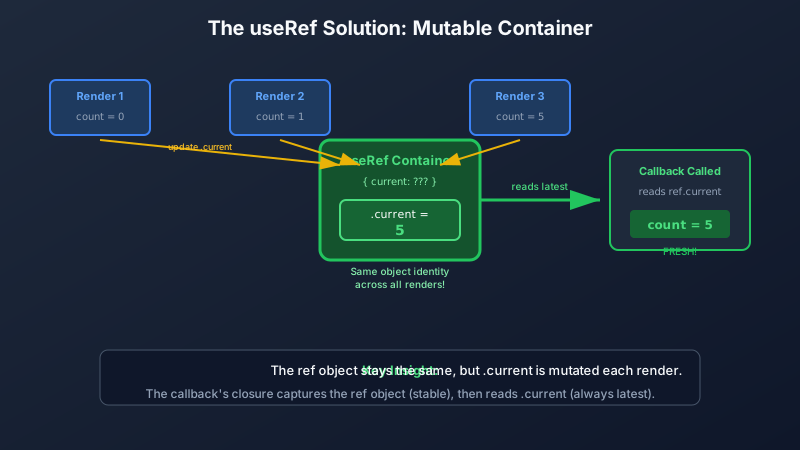
Before useEffectEvent, the standard pattern was to mirror values into a useRef:
import { useEffect, useLayoutEffect, useState, useRef } from "react";

function Dashboard({ teamId }: { teamId: string }) {
  const [includeArchived, setIncludeArchived] = useState(false);
  const [data, setData] = useState(null);

  // Step 1: Create a ref
  const includeArchivedRef = useRef(includeArchived);

  // Step 2: Keep ref in sync with state using useLayoutEffect
  // This runs synchronously BEFORE useEffect, guaranteeing the ref is current
  useLayoutEffect(() => {
    includeArchivedRef.current = includeArchived;
  }, [includeArchived]);

  // Step 3: Read from ref in your Effect
  useEffect(() => {
    const fetchData = async () => {
      const response = await fetch(
        `/api/team/${teamId}/tasks?archived=${includeArchivedRef.current}`
      );
      const json = await response.json();
      setData(json);
    };

    fetchData();
    const intervalId = setInterval(fetchData, 10000);
    return () => clearInterval(intervalId);
  }, [teamId]);

  // ... JSX
}
Why useLayoutEffect instead of useEffect?
You might wonder: “Can’t I just use two useEffect hooks in order? The first one syncs the ref, the second one reads it.”
In practice, this often works. React typically runs effects in declaration order. But here’s the catch: the React documentation does not explicitly guarantee execution order between multiple useEffect hooks. The docs state that effects run after the component commits, but the precise ordering between multiple effects—especially across concurrent rendering, Suspense boundaries, or future React versions—is not part of React’s public API contract.
useLayoutEffect provides an explicit guarantee. From the React docs:
“
useLayoutEffectis a version ofuseEffectthat fires before the browser repaints the screen.”“React guarantees that the code inside
useLayoutEffectand any state updates scheduled inside it will be processed before the browser repaints the screen.”
This means the execution order is well-defined:
- Component renders
- React commits changes to DOM
useLayoutEffectruns synchronously → ref is synced- Browser paints the screen
useEffectruns → reads the already-updated ref
By using useLayoutEffect for the sync, you’re relying on documented, guaranteed behavior rather than observed-but-unspecified implementation details.
The downsides of this pattern:
- Extra
useRefdeclaration - Extra
useLayoutEffectto keep it synced - Remember to read
.currentnot the state directly - Repeat for every value you need to “escape”
- Easy to accidentally use
useEffectinstead (which might work… until it doesn’t)
useEffectEvent automates this exact pattern and eliminates these footguns.
A Note on Function Identity
⚠️ Common confusion: is the returned function stable?
You might wonder: is
onMessage(the function returned byuseEffectEvent) stable—the same reference each render likeuseCallbackprovides?No, and it doesn’t matter.
React returns a new
onMessagefunction each render. If you putonMessagein a dependency array, your Effect would re-run every render—which is a sign you’re using it wrong.Why it still works: Every version of
onMessage(from render 1, render 2, etc.) reads from the same internal ref. React keeps that ref updated. So when a subscription calls theonMessageit captured on render 1, it still reads the current callback with current values.Bottom line: Don’t worry about stability. Just follow the rule—call it from Effects, never list it as a dependency.
How It Works Under the Hood
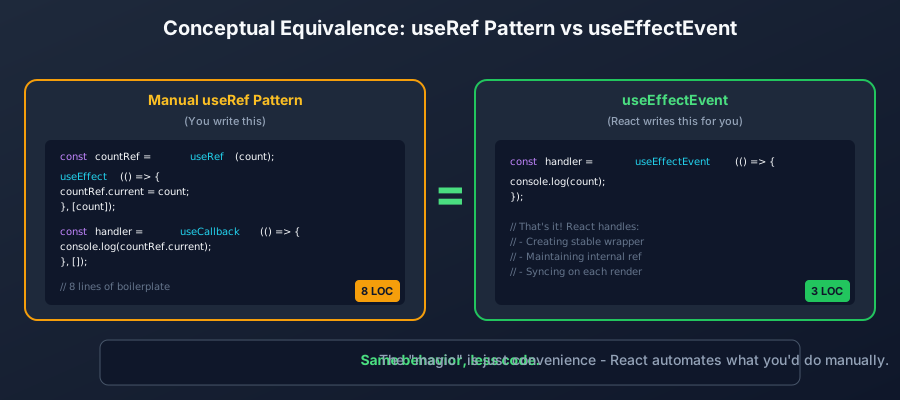
There’s no magic here. useEffectEvent does exactly what you’d do with useRef, but React handles it for you.
Here’s a conceptual model (not the actual React implementation):
function useEffectEvent<T extends (...args: any[]) => any>(callback: T): T {
  const latestCallbackRef = useRef(callback);

  // React actually updates this during commit phase, not render
  // (simplified here for clarity)
  latestCallbackRef.current = callback;

  // Returns a NEW function each render - intentionally!
  // All versions read from the same ref, so they all get latest values
  return ((...args: Parameters<T>) => {
    return latestCallbackRef.current(...args);
  }) as T;
}
The key insight: All function instances share the same ref. Even if your Effect captured an “old” function from render 1, calling it reads from latestCallbackRef.current—which points to the latest callback.
Visualizing the Stale Closure Problem
How useRef Solves It
How useEffectEvent Works
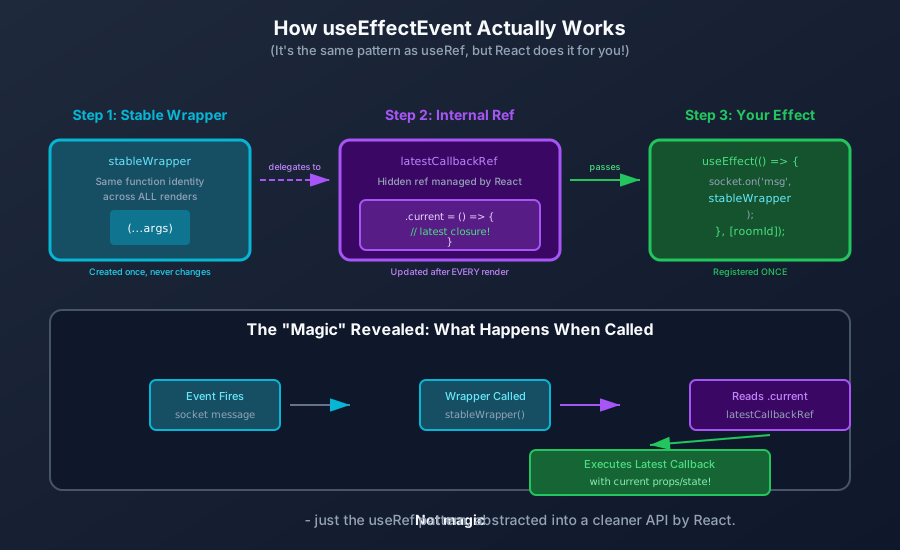
The Equivalence
Rules and Caveats
useEffectEvent comes with important rules. The eslint-plugin-react-hooks (version 6.1.1+) enforces these.
Rule 1: Only Call Effect Events from Inside Effects
Effect Events are designed for one purpose: being called from within Effects.
// ✅ Correct: Called from inside an Effect
const onMessage = useEffectEvent((msg: string) => {
  console.log(msg, latestState);
});

useEffect(() => {
  socket.on("message", onMessage);
  return () => socket.off("message", onMessage);
}, []);

// ❌ Wrong: Called from an event handler
<button onClick={() => onMessage("hello")}>Click me</button>

// ❌ Wrong: Called during render
return <div>{onMessage("rendered")}</div>;
React actively guards against this—it will throw an error if you call an Effect Event outside an Effect context.
For regular event handlers (onClick, onChange, etc.), you don’t need useEffectEvent. Those handlers run fresh on each interaction with current values.
Rule 2: Don’t Pass Effect Events to Other Components
Keep Effect Events local to their component:
// ❌ Wrong: Passing Effect Event as a prop
function Parent() {
  const onTick = useEffectEvent(() => {
    console.log(latestCount);
  });

  return <Timer onTick={onTick} />; // Don't do this!
}

// ✅ Correct: Keep Effect Events local
function Parent() {
  const [count, setCount] = useState(0);

  const onTick = useEffectEvent(() => {
    console.log(count);
  });

  useEffect(() => {
    const id = setInterval(() => onTick(), 1000);
    return () => clearInterval(id);
  }, []);

  return <div>Count: {count}</div>;
}
Rule 3: Don’t Use useEffectEvent to Suppress Linter Warnings
This is about intent. Ask yourself: “When this value changes, should the Effect re-run?”
- Yes → It’s a dependency, list it
- No → Wrap the logic in an Effect Event
// ❌ Wrong: Using useEffectEvent to avoid listing page as dependency
const fetchData = useEffectEvent(async () => {
  const data = await fetch(`/api/items?page=${page}`);
  setItems(data);
});

useEffect(() => {
  fetchData();
}, []); // "Now I don't need page in deps!" <- Wrong thinking!

// ✅ Correct: page SHOULD be a dependency - you WANT to refetch when it changes
useEffect(() => {
  async function fetchData() {
    const data = await fetch(`/api/items?page=${page}`);
    setItems(data);
  }
  fetchData();
}, [page]);
When Should You Use useEffectEvent?
Use it when you have a callback inside an Effect that:
- Is passed to a subscription, timer, or external library that you don’t want to re-register
- Needs to read the latest props/state when it’s called
- Those values shouldn’t trigger the Effect to re-run
| Scenario | Reactive (triggers Effect) | Non-reactive (Effect Event) |
|---|---|---|
| Chat room connection | roomId | isMuted, theme |
| Polling dashboard | teamId | includeArchived, sortOrder |
| Analytics logging | pageUrl | cartItemCount, userId |
| WebSocket messages | socketUrl | isOnline, preferences |
| Interval timer | - (runs once) | count, step |
React Version Notes
useEffectEvent was introduced as a stable feature in React 19.2. If you’re on an earlier version:
- React 18.x and earlier: Use the
useRefpattern described above - React 19.0-19.1:
useEffectEventwas available but experimental - React 19.2+: Use
useEffectEventconfidently
Check your React version:
npm list reactSummary
useEffectEvent solves one specific problem: reading fresh values in an Effect callback without those values causing the Effect to re-run.
That’s the whole thing. No other magic.
The mental model:
- Dependencies answer: “When should this Effect re-run?”
- Effect Events answer: “What values should I read when the Effect’s callback runs?”
By separating these concerns, your code becomes clearer and bugs become harder to introduce.
Further Reading
- React Docs: useEffectEvent Reference - Official API documentation
- React Docs: Separating Events from Effects - In-depth conceptual guide
- React Docs: useEffect Reference - Comprehensive Effect documentation
- MDN: Closures - Understanding the JavaScript concept behind stale closures