Building Lost Contact Finder in 2 Days with Claude Code
TL;DR
After losing contacts and calendar events for most of my adult life to silent sync failures, I finally built a solution. Lost Contact Finder takes periodic snapshots of your iCloud data, detects what’s changed or disappeared, and lets you safely restore lost items. I built it in about 2 days with Claude Code AI pair programming. Try it at lost-contact-finder.connectionroad.com - my wife and I use it daily with our real data.
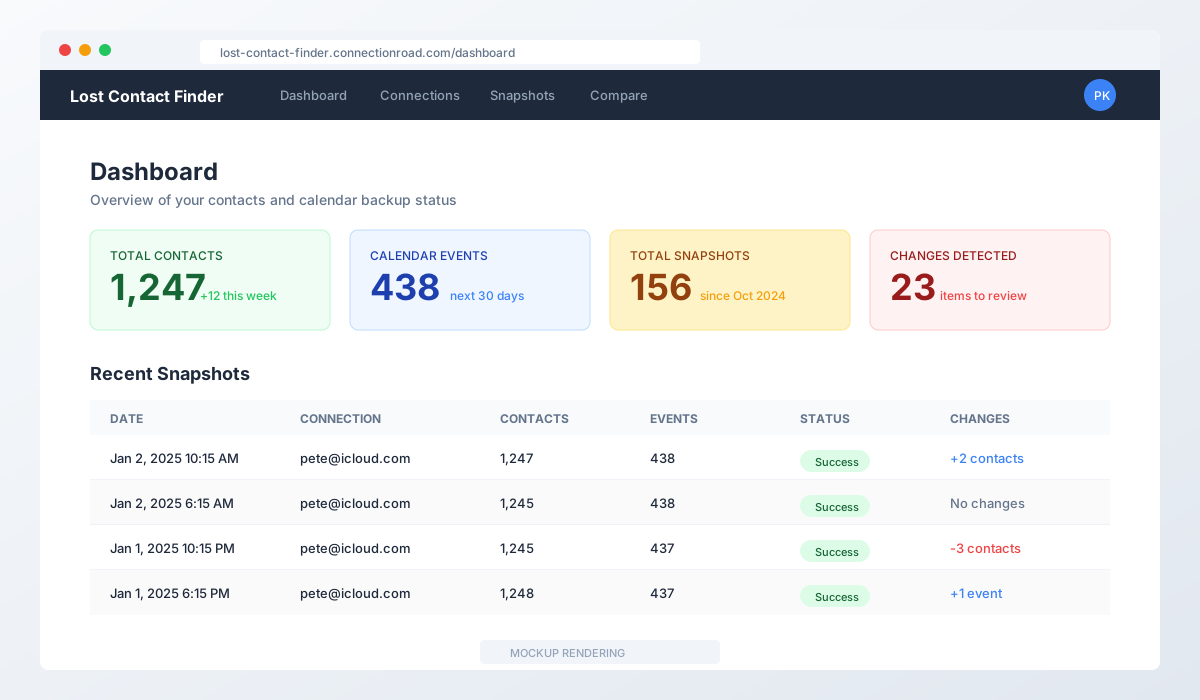 Mockup rendering of the dashboard showing recent snapshots
The Problem: Silent Data Loss
I’ve been losing contacts and calendar events for most of my adult life. Not through carelessness - through sync.
You know the feeling. You’re trying to call someone and think, “I know I had their number.” You search your contacts. Nothing. Did you delete it? Did you never save it? Or did some invisible sync conflict between your iPhone, Mac, and iCloud silently eat it?
For years, I’ve suspected that sync was losing my data. I just never had proof - or a way to get it back.
The problem is that cloud providers like iCloud and Google don’t give you a change history. They don’t tell you “Hey, 47 contacts were deleted last Tuesday during that sync conflict.” They just… sync. And sometimes things disappear.
Calendar events are even worse. Missing a meeting because the event vanished? Good luck proving it ever existed.
The Motivation: Why I Finally Built This
I’ve wanted a “safety net” for my contact and calendar data for years. Something that would:
- Take regular snapshots of my data
- Tell me what changed between snapshots
- Let me restore things that disappeared
I tried manual exports. I tried various backup apps. Nothing did exactly what I wanted: forensic analysis of what changed between any two points in time.
The realization that finally pushed me to build this: iCloud doesn’t tell you what was deleted last week. Neither does Google. Once it’s gone, you don’t even know what you lost.
Enter Claude Code: AI Pair Programming
Claude Code is Anthropic’s CLI tool for AI pair programming. It’s like having a senior developer who never gets tired, knows every framework, and can implement complex protocols from memory.
This project was perfect for Claude Code because:
- Complex protocols: CardDAV and CalDAV are not simple. The RFCs are dense. Claude Code implemented both clients correctly.
- Full-stack complexity: Next.js 16, React 19, Prisma, Redis, BullMQ, encryption - lots of moving parts.
- Fast iteration: I could describe what I wanted and see it implemented in minutes.
Here’s a taste of the technical complexity Claude Code handled - the CardDAV client that fetches contacts from iCloud:
export async function fetchContacts(
  connection: Connection
): Promise<NormalizedContact[]> {
  const { username, appPassword } = await decryptCredentials(connection);

  const response = await fetch(
    `https://contacts.icloud.com/${username}/carddavhome/card/`,
    {
      method: 'REPORT',
      headers: {
        'Content-Type': 'application/xml',
        'Authorization': `Basic ${Buffer.from(`${username}:${appPassword}`).toString('base64')}`,
        'Depth': '1',
      },
      body: `<?xml version="1.0" encoding="utf-8"?>
        <card:addressbook-query xmlns:d="DAV:" xmlns:card="urn:ietf:params:xml:ns:carddav">
          <d:prop>
            <d:getetag/>
            <card:address-data/>
          </d:prop>
        </card:addressbook-query>`,
    }
  );

  // Parse vCard responses and normalize to JSON...
}
In about 2 days of focused work with Claude Code, I went from idea to working application.
What Lost Contact Finder Does
1. Snapshot Your Data
The app connects to your iCloud account via CardDAV and CalDAV protocols (the same protocols your devices use to sync). It takes point-in-time snapshots on a schedule you choose - from every 15 minutes to weekly.
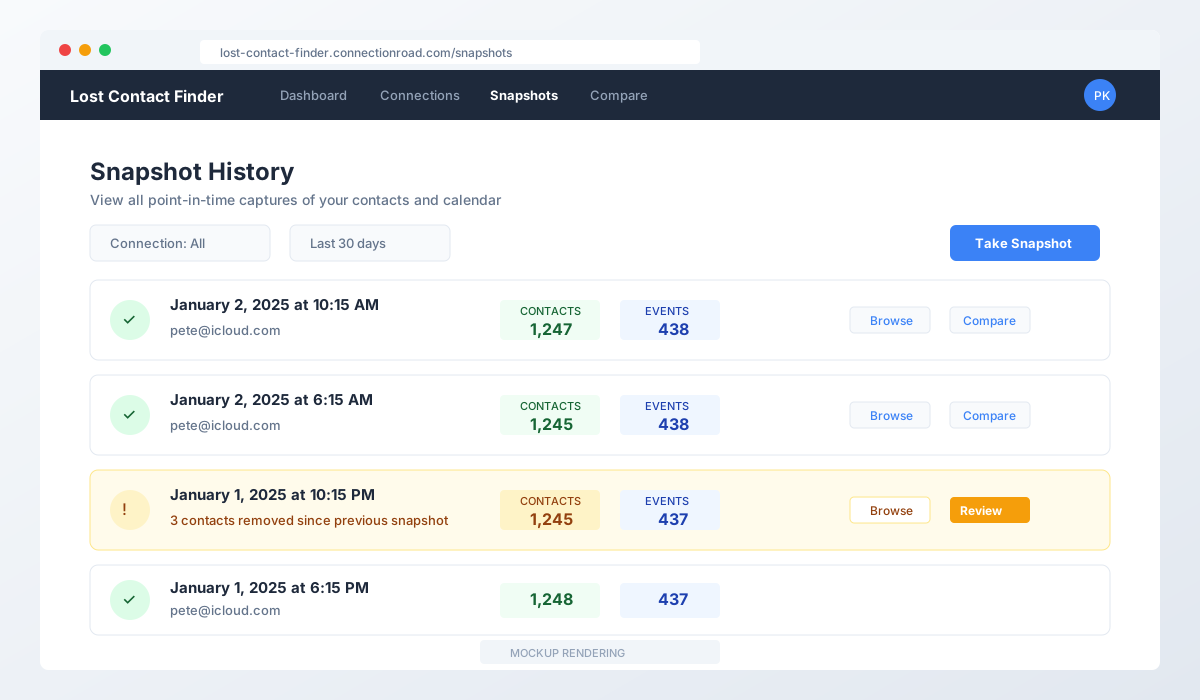 Mockup rendering of snapshot history with contact and calendar counts
2. Detect Changes
Compare any two snapshots to see exactly what changed. The app shows:
- Added items: New contacts or events that appeared
- Removed items: Things that disappeared (the important ones!)
- Modified items: Changes to existing data with field-by-field diffs
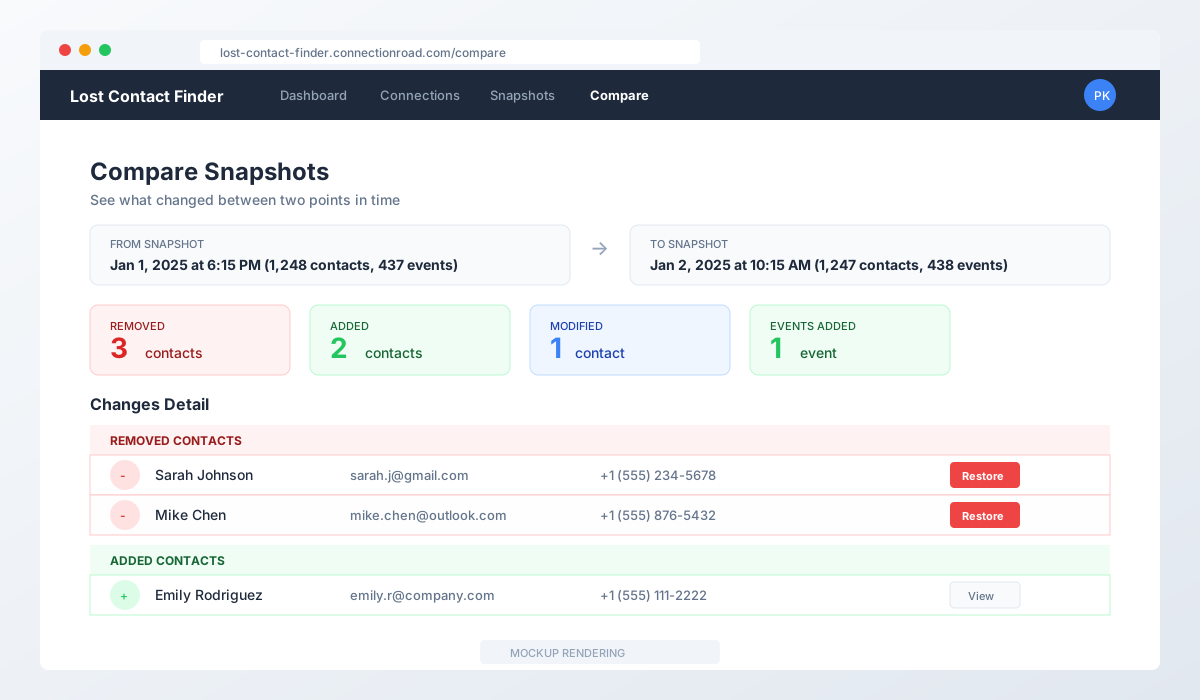 Mockup rendering of the comparison view showing detected changes
3. Browse Your History
View any snapshot’s contents - all your contacts and calendar events as they existed at that moment in time. See contact photos, phone numbers, emails, everything.
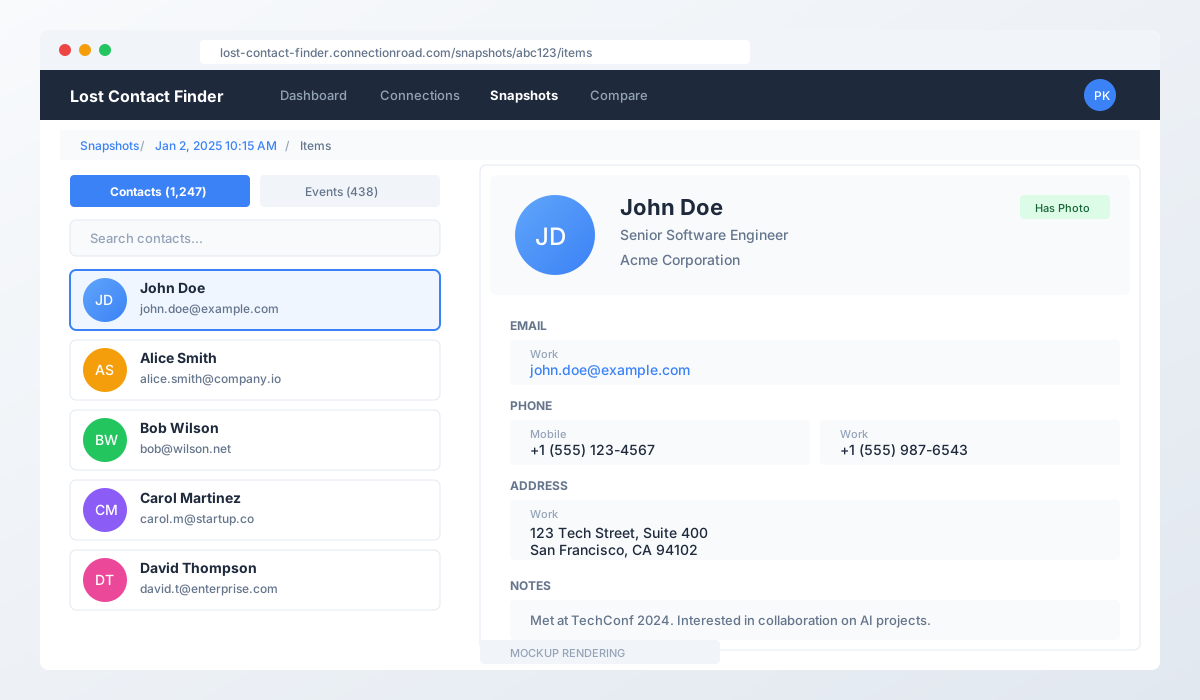 Mockup rendering of the items browser showing contact details
4. Propose Safe Restores
This is where safety-first design comes in. Before actually restoring anything, you can “propose” a restore. This generates the exact data that would be pushed back to iCloud - without actually sending it. You review everything first.
5. Execute Restores (When Ready)
Once you’ve reviewed and confirmed, you can execute the restore. The app pushes the recovered items back to iCloud, and logs everything for an audit trail.
Site Map: The Full Application
Here’s the structure of the application:
Lost Contact Finder Site Structure
==================================

Public Pages
------------
/                       Landing page
/about                  About the project
/privacy                Privacy policy
/terms                  Terms of service
/code-of-conduct        Community guidelines

Authentication
--------------
/auth/signin            Login page
/auth/register          Account creation
/auth/forgot-password   Password reset request
/auth/reset-password    Password reset (with token)
/auth/verify-email      Email verification

Main Application (Authenticated)
--------------------------------
/dashboard              Overview with stats and recent activity
|
+-- /connections        Manage iCloud accounts
|   +-- /new            Add new iCloud connection
|   +-- /[id]           Edit connection settings
|
+-- /snapshots          Browse snapshot history
|   +-- /[id]           View single snapshot
|       +-- /items      Browse contacts & events
|       +-- /binary     View photos/attachments
|       +-- /changes    See what changed
|
+-- /compare            Compare two snapshots side-by-side
|
+-- /restore            Propose or execute restores
|
+-- /restore-history    Audit log of all restore actions
|
+-- /settings           User preferences

Admin Section (Superadmin only)
-------------------------------
/admin
+-- /users              User management
+-- /queues             Job queue monitoring
+-- /config             System configuration
Technology Stack
| Layer | Technology |
|---|---|
| Frontend | Next.js 16, React 19, Tailwind CSS 4 |
| Backend | Next.js App Router API Routes |
| Database | MySQL + Prisma 7 |
| Job Queue | Redis + BullMQ |
| Auth | NextAuth v5 |
| Encryption | AES-256-GCM |
Key Technical Decisions
1. Immutable Snapshots
Once a snapshot is created, it’s never modified. This gives you a reliable audit trail and makes it impossible to accidentally corrupt historical data.
2. Propose Mode by Default
All restores start in “propose” mode. You see exactly what will happen before anything is written. This builds trust and prevents accidents.
3. Read-Only Safety Switch
There’s a global environment variable that completely disables all writes to iCloud. When I’m testing or debugging, I flip this switch and can explore without any risk.
4. Encrypted Credentials
Your iCloud app password is encrypted at rest using AES-256-GCM. Even if someone got database access, they couldn’t read your credentials.
5. REST-Only Architecture
All data access goes through REST APIs. No server functions, no magic. Clean separation between frontend and backend.
Try It Yourself
URL: https://lost-contact-finder.connectionroad.com
What you need:
- An iCloud account
- An app-specific password (generate one at appleid.apple.com)
- A few minutes to set up your first connection
Transparency:
- I use this with my real contacts and calendar
- My wife uses it daily with her iCloud account
- We trust it enough to run it on our actual data
Fair warnings:
- This is in testing phase
- Data might get deleted if there are major issues that need addressing (unlikely, but possible)
- Try it at your own risk
- Free for now, but no promises on pricing
Security note: Use an app-specific password, not your main iCloud password. App-specific passwords can be revoked anytime and don’t give full account access.
What’s Next
- Google Calendar/Contacts support
- Better change visualization with timeline view
- More granular restore options
- Mobile-friendly improvements
- Community feedback welcome!
Conclusion
Silent data loss is real. I’ve been experiencing it for decades without proof. Now I have both proof and a solution.
Building this with Claude Code was remarkably fast. What would have taken weeks of reading RFCs and debugging edge cases took about 2 days. AI pair programming is genuinely transformative for projects like this.
If you’ve ever wondered “where did that contact go?” - now you can find out. And maybe get it back.
Further Reading
- Claude Code - Anthropic’s AI pair programming tool
- CardDAV Protocol RFC 6352 - The protocol for contact sync
- CalDAV Protocol RFC 4791 - The protocol for calendar sync
- Next.js Documentation - The React framework used
- Prisma ORM - Database toolkit
Note: The screenshots in this post are mockup renderings. They represent the actual UI but may differ slightly from the live application.