Surprisingly, (and happily) it’s not hard to reference all data inside a class using EF’s codefirst in a 1 to 1 type relationship. Let’s take as an example a very simple relationship where we have a customer who has a detail record. The model definition for this is as follows:
namespace Con1 { public class SiteDB : DbContext { public DbSet<Detail> Details { get; set; } public DbSet<Customer> Customers { get; set; } }<span class="kwrd">public</span> <span class="kwrd">class</span> Customer { [Key] [DatabaseGenerated(DatabaseGeneratedOption.Identity)] <span class="kwrd">public</span> <span class="kwrd">long</span> Id { get; set; } <span class="kwrd">public</span> <span class="kwrd">string</span> Name { get; set; } } <span class="kwrd">public</span> <span class="kwrd">class</span> Detail { [Key] [DatabaseGenerated(DatabaseGeneratedOption.Identity)] <span class="kwrd">public</span> <span class="kwrd">long</span> Id { get; set; } [ForeignKey(<span class="str">"CustomerId"</span>)] <span class="kwrd">public</span> Customer Customer { get; set; } <span class="kwrd">public</span> <span class="kwrd">long</span> CustomerId { get; set; } <span class="kwrd">public</span> <span class="kwrd">string</span> DetailDescription { get; set; } }}
The idea is that we want to be able to get to a Customer Name by traversing a Detail record in one step. We need to use the “Include” feature of codefirst to do this. Below is the code that successfully works:
class Program { static void Main(string[] args) { Database.SetInitializer(new SiteDBInitializer());<span class="kwrd">using</span> (var context = <span class="kwrd">new</span> SiteDB()) { Console.WriteLine(context.Customers.Count()); var details = context.Details.Include(o => o.Customer); <span class="kwrd">foreach</span> (var detail <span class="kwrd">in</span> details) { Console.WriteLine( String.Format( <span class="str">"DetailId: {0} CustomerId: {1} Customer.Name: {2}"</span>, detail.Id,detail.CustomerId,detail.Customer.Name)); } } }}
internal class SiteDBInitializer : CreateDatabaseIfNotExists<SiteDB> { protected override void Seed(SiteDB context) {
context.Details.Add(<span class="kwrd">new</span> Detail { Customer = <span class="kwrd">new</span> Customer {Name = <span class="str">"pkellner"</span>}, DetailDescription = <span class="str">"descr1"</span> }); context.SaveChanges(); }}
When we run this code we get:
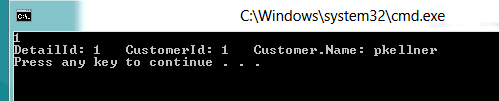
Seems simple but it took me a while before I finally decided to make a simple example to prove to myself that this really works.
HTH’s.