
Background
At my company, we have been running a workflow process that is taking 6 hours to complete. This is a new project so we’ve had the good fortune to be able to use the latest Microsoft technologies. We are a Microsoft shop, so that means Sql Server 2008, C#, ASP.NET, ExtJS, LINQ to SQL (hoping to move to Entity Framework someday) and others. After spending all day running performance analysis tools and basically performing a full audit of the 6 hour process, we sadly concluded that our time was being eaten up by LINQ to SQL processing. My experience has always been that anything you do on the compiled code side is usually overwhelmed by database access times, usually at least ten to one. Well, I learned a lot yesterday.
The Problem
Since I already know the answer, I put together a very trivial problem to solve. What I want to do is execute one simple SQL statement over and over. I’m going to query just one table that actually has no records in it just to make sure the database really has nothing to do. I’m going to make this connection on my blazingly fast Lenovo W500 with a SATA SSD running Sql Server 2008 locally. I’m going to run that simple query first calling just ADO.NET (bare bones using best practices), Then using LINQ to SQL in the way I’ve always used it (and I would say 99% of the other developers out there), then I’m going to compile that LINQ to SQL and run it again. Actually, I’m going to iterate 2000 times for each of the three conditions.
So, here is the simple SQL I’m executing:
SELECT
  Id,
  FileName,
  FileSize,
  UploadDate,
  DownloadDate,
  ProcessDate
FROM
  LinqTest
WHERE
  dbo.LinqTest.FileName = 'MyVal'
The Shocking Results
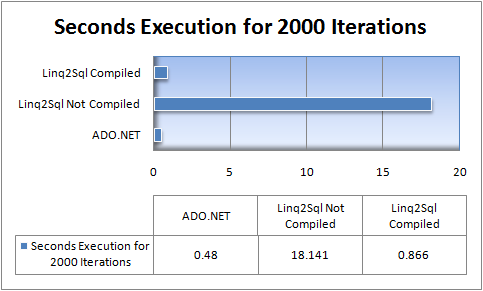
Or, for those graphically challenged (like search engines), Here is the actual data.
| Test Description | Seconds Execution for 2000 Iterations |
| ADO.NET | 0.48 |
| Linq2Sql Not Compiled | 18.14 |
| Linq2Sql Compiled | 0.87 |
In English, this says that
- LINQ to SQL is 37 times slower than running a raw ADO.NET Sql query
- LINQ to SQL compiled 1.8 times slower than running a raw ADO.NET Sql query
I’ve read in several places that compiling your LINQ will help, but I have never heard anyone say how drastic the speed improvement can be. For example, in one of my favorite books (LINQ in Action) by Fabrice Marguerie and others, he quotes on page 296 a blog post by Rico Mariani titled DLINQ (Linq to SQL Performance (Part 1) as saying using a compiled query offers nearly twice the performanced of a non-compiled query, and goes on to say that it brings the performance to within 93% of using a raw data reader. Well, suffice it to say I never ran the test myself. I could have lived with twice, but not 37 times.
Here is the Project File Source:
How to Compile you SQL (seems like a duh kind of thing)
It’s actually not very hard. I’m attaching the Visual Studio 2008 project that I ran this test with to this post so you can run it for yourself as well as see an example of how to write the compiled LINQ code. Below is the method that actually does the work. I won’t include in this article the actual ADO.NET and LINQ to SQL not compiled code, but you can see those for yourself in the attached solution.
1: /// <summary>
2: /// This method compiles the LINQ to SQL query and
3: /// then executes it the number of iterations passed
4: /// in.
5: /// </summary>
6: /// <param name="iterations">Number of iterations</param>
7: /// <returns>time in seconds of execution</returns>
8: private static double
9: TestDataAccessSpeedLinq2SqlCompiled(int iterations)
10: {
11: Func<DataClassesDataContext, string, IQueryable<LinqTest>> compiledQuery =
12: CompiledQuery.Compile((DataClassesDataContext meta,string fileNameForSearch) =>
13: (from myData in meta.LinqTests
14: orderby myData.Id
15: where myData.FileName.Equals(fileNameForSearch)
16: select myData));
17:
18: var metaNew = new DataClassesDataContext();
19: DateTime startTime = DateTime.Now;
20: for (int i = 0; i < iterations; i++)
21: {
22: IOrderedQueryable<LinqTest> query =
23: (IOrderedQueryable<LinqTest>)
24: compiledQuery(metaNew,string.Format("abcde{0}", i));
25: List<LinqTest> newList = query.ToList();
26: }
27: return
28: DateTime.Now.Subtract(startTime).Duration().TotalSeconds;
29: }
Essentially, line 11 is compiling the code into an instance variable called compileQuery. Using this instance variable, you can now execute the LINQ query in a compiled form while still passing in variable data such as fileNameToSearch. Again, the important thing to note is that one line 24 compiledQuery is already compiled so the IOrderedQueryable result is obtained without having to recompile the LINQ statement.
Conclusions
So, from this, it seems that you should always compile your LINQ to SQL queries. Well, that’s not quite true. What I’m recommending is that if you have a reason to execute the same query over and over you should strongly consider compiling. If for example, you are just making a LINQ to SQL call once, there is no benefit because you have to compile it anyway. Call it ten times? Well, you will have to decide for yourself.
Forewarned is forearmed! good luck and hope this helps.