
Microsoft has made building a WCF Web Service to communicate with JavaScript very easy in Visual Studio 2008. In this post, I'll go through the basics of building this app and demonstrate it working. Included is the project file which might be a help so you can run it yourself. I have found a lot of other posts on the web about this same topic but have had little luck getting the code to work. Few authors post projects with actual working code. I try to as often as I can because I know how frustrating it can be to not be able to get something working.
Code Associated With this Article Visual Studio Project
First, create an ASP.NET 3.5 Web site. That is, go into File / New Website and choose ASP.NET Web Site.
Then, Add a new Item to the root of the project called WCF Service and name it SimpleService.svc.
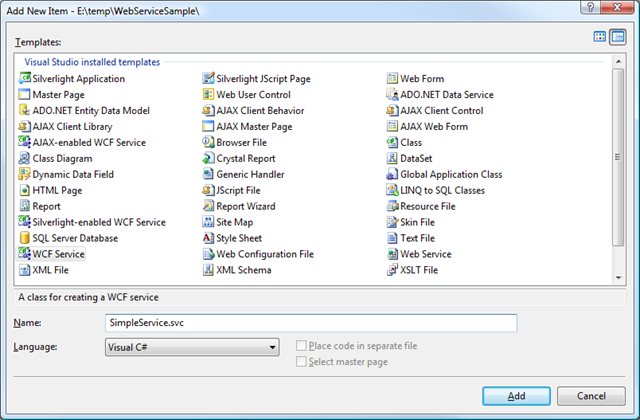
This will create the service for you in your project and also update your web.config by updating the <system.serviceModel> section. I'm sure it's doing a stellar job, however I could not get the service to work with what it did so if you know more about it than I do, don't follow my advice here. However, if you replace what it generated with the following section, it will work (at least with .Net 3.5sp1, Visual Studio 2008 sp1).
<system.serviceModel>
<behaviors>
<endpointBehaviors>
<behavior name="LoadDataAspNetAjaxBehavior">
<enableWebScript/>
</behavior>
</endpointBehaviors>
</behaviors>
<serviceHostingEnvironment aspNetCompatibilityEnabled="true">
</serviceHostingEnvironment>
<services>
<service name="LoadData">
<endpoint address=""
behaviorConfiguration="LoadDataAspNetAjaxBehavior"
binding="webHttpBinding" contract="LoadData"/>
</service>
</services>
</system.serviceModel>
So, Visual Studio 2008 created a nice interface and implemented that interface. I'm going to suggest (again, for the sake of getting this working for the first time) that you remove both of those files and replace it with the file below. That is, we will not no interface and no implementation of the interface, just the ordinary class (SimpleService.cs).
using System.Collections.Generic;
using System.Runtime.Serialization;
using System.ServiceModel;
using System.ServiceModel.Activation;
[ServiceContract(Namespace = "")]
[AspNetCompatibilityRequirements
(RequirementsMode = AspNetCompatibilityRequirementsMode.Allowed)]
public class SimpleService
{
// Add [WebGet] attribute to use HTTP GET
[OperationContract]
public List<CityState> RetrieveAll()
{
var listData = new List<CityState>
{
new CityState {city = "Hartsdale", state = "NY"},
new CityState {city = "San Jose", state = "CA"},
new CityState {city = "Chicago", state = "IL"}
};
return listData;
}
}
[DataContract]
public class CityState
{
[DataMember]
public string city { get; set; }
[DataMember]
public string state { get; set; }
}
Now, Add to your default.aspx page the ScriptManager control and add the SimpleService.svc to it as well as the javascript file default.aspx.js you just created. Make sure to add ScriptManager after the <form tag.
<asp:ScriptManager runat="server" ID="SMP1">
<Services>
<asp:ServiceReference Path="~/SimpleService.svc" />
</Services>
<Scripts>
<asp:ScriptReference Path="~/Default.aspx.js" />
</Scripts>
</asp:ScriptManager>
Now, what we have is a JavaScript file (Default.aspx.cs) that automatically will get included with running your Default.aspx page. Because ScriptManager is running and we have included the SimpleService, JavaScript code will also be injected that gives us the plumbing to call the SimpleService web service.
Almost finally, we have a service defined and hopefully it is ready for the JavaScript. Add a new JavaScript file to your solution called Default.aspx.js. This will be the javascript that actually calls the service we built (SimpleService).
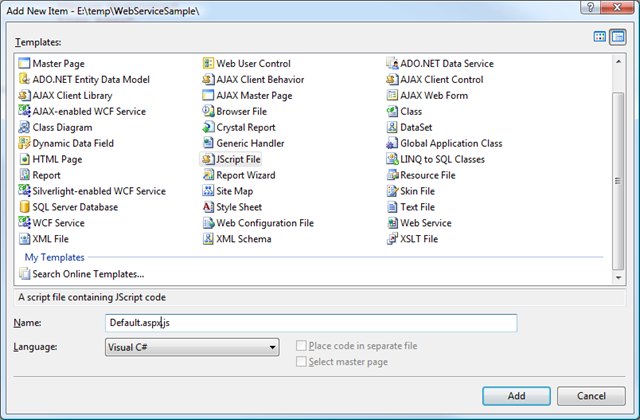
Put the following Javascript in the Default.aspx.js page.
function pageLoad() {
SimpleService.RetrieveAll(OnRetrieveLoadData);
}
function OnRetrieveLoadData(dataList) {
// javascript kindly donated from x-format on this thread:
// http://forums.asp.net/p/1319775/2620025.aspx#2620025
var divObj = document.getElementById('myTable');
var city = 'The City';
var state = 'The State';
var tableStart =
'<table cellspacing="5" cellpadding="0" border="1">' +
'<tbody><tr><th>City</th><th>State</th></tr>';
var tableContent = '';
var tableEnd = '</tbody></table>';
for (var i = 0; i < dataList.length; i++) {
tableContent += '<tr><td>' + dataList[i].city
+ '</td><td>' + dataList[i].state + '</td></tr>';
}
divObj.innerHTML = tableStart + tableContent + tableEnd;
}
(The above JavaScript was given to me by a kind user named x-format on forums.asp.net. Here is the thread with my request and the response)
http://forums.asp.net/t/1319775.aspx
Then, when you run the example, this is what you get.

Several authors have mentioned that you can avoid all the WCF plumbing in the WCF file by using the following code in your svc file:
<%@ ServiceHost
Language="C#"
Service="SimpleService"
Factory="System.ServiceModel.Activation.WebScriptServiceHostFactory"
%>
In conclusion, I just want to say that this has been a particularly frustrating episode for me. I'm new to WCP and it sure does not feel good. I can do this over and over again I'm sure, but if the formula changes I'm stuck. It's not like Microsoft to make settings so cryptic and error prone with no good way to debug them that I know of.
Hope this post helps.