
I'm just starting out using WCF in an application for the first time. I'm using Visual Studio 2008 sp1 and created an asp.net web site from the standard create project wizard. I then created a simple AJAX--enabled WCF Service as follows:

I then added some code to the service that looks like the following (using MapPath):
[ServiceContract(Namespace = "")][AspNetCompatibilityRequirements(RequirementsMode = AspNetCompatibilityRequirementsMode.Allowed)]
public class TrackData
{ // Add [WebGet] attribute to use HTTP GET [OperationContract]
<span class="kwrd">public</span> List<TrackDataList> RetrieveTrackDataByLap(<span class="kwrd">int</span> excerciseId, <span class="kwrd">int</span> lapNumberToShow) { var listTrackData = <span class="kwrd">new</span> List<TrackDataList>(); <span class="kwrd">string</span> fileName = HttpContext.Current.Server.MapPath(<span class="str">"~/App_Data/sample.tcl"</span>); Activity activity = GarminUtils.ConvertTCS(fileName);I call it with JavaScript as follows:
/// <reference path=“MapLive.aspx” />
/// <reference path=”../VEJS/VeJavaScriptIntellisenseHelper.js” />
function pageLoad() {
TrackData.RetrieveTrackDataByLap(0, 0, OnRetrieveTrackDataByLapComplete);}
function OnRetrieveTrackDataByLapComplete(TrackDataList) {
alert(<span class="str">'OnRetrieveTrackDataByLapComplete called'</span>);}
And, I'm surprised to find that I get a JavaScript error saying MapPath is undefined. So, after a little digging I discover that I need to set aspNetCompatibilityEnabled to true in my web.config as follows:
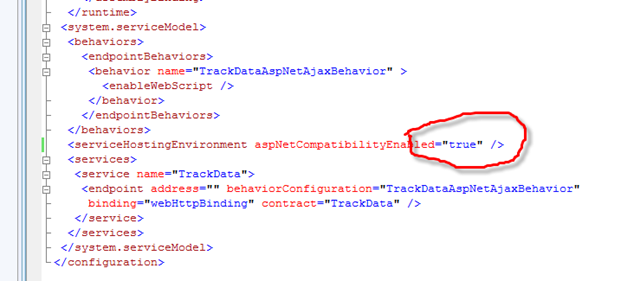
By default, it is set to false. Hope this Helps!