Display Images with IIS7 in Vista or Windows 2008
Tuesday 1 April 2008 @ 5:38 am


So, this may seem simple, but for an hour I wrestled with displaying images on IIS7 with vista.  ASP.NET worked fine, but no static files, css, jpg’s, gif’s or anything.  Just unformatted text.

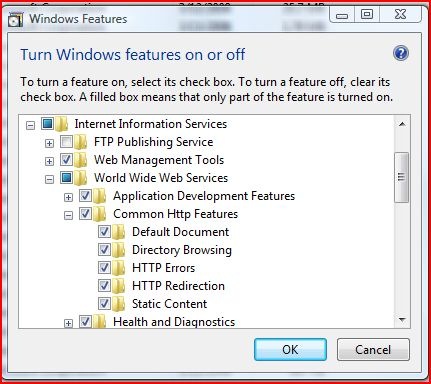
Turns out when I added the web server in vista, I forgot to check the Static Content checkbox under World Wide Web Services / Common Http Features.

Hope this finds you if you are having the same problem.
webconfig


11 Responses to “Display Images with IIS7 in Vista or Windows 2008”

  1. Shahmir Noorani Says:

    Good find m8. Thanks for the help.

  2. David Conlisk Says:

    Thanks for the tip! Saved me some time. For other non-Vista users like myself, here’s how you find that dialog:

    Click Start -> Control Panel -> Programs and Features -> Turn Windows features on or off

    Then drill down into IIS as shown in the image above.

    Cheers,

    David

  3. Mike Says:

    Thanks for the tip, this was really getting on my nerves.

  4. NET Web Services Says:

    Nice suggestion… Many people forget to check the Static Content checkbox…

  5. Austin Says:

    Thank you. This is what I needed.
    Funny that “common features” are not enabled by default.

  6. mitch Says:

    Awesome! I spent hours surfing the web trying to figure this out, finding multiple forums where someone would have the same problem, then eventually end the thread with “Solved it, thanks” and not post the answer. Funny how a night’s rest and a new search comes up with the answer almost right away.

  7. mitch Says:

    Forgot to say thanks!

  8. Tedi Says:

    Great info dude…

    Just like Mitch, I’ve been wasting my time to look around….even on the MSDN sites.

    Thank u very much…

  9. Danilo Says:

    Thank you from Dallas,TX! I had been looking for a couple of hours for the solution of this same problem in Windows 7. Thanks again!

  10. vishal gondil Says:

    thanks …………….
    really good solution……………

  11. ferdi Says:

    This does not work on IIS7.5?

    I am still stuck on the stage that static content is not rendered through pages.

    I have enabled Static Content through the turn features on/off, but still I cannot get to properly render pages, as it is missing image files, stylesheets and related…

    The weird part is that, if I open the standard IIS start page:

    http://localhost (works fine – images and styles and related are properly rendered)

    http://servername (works fine – images and styles and related are properly rendered; this is on the server and lan clients)

    http://publicip (does not render images, styles and related – this was tested from external network)

    for some reason my page does exaclty the same as yours did, I can render html pages, or aspx pages, but none of the images or static content is render

    any help would be much appreciated! thanks

Leave a Reply