The Typical Way
When you first create an asp.net project a file is usually created in your root web directory called web.config. By default there are two (usually empty) sections in the file. One for appSettings, and one for connectionStrings. Below is a default project created with visual studio 2008 and a sample web.config file.
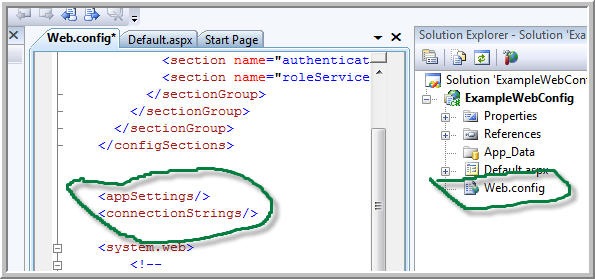
The thing you would normally do is put stuff in those tags that your application would use. That is, you would would likely put in a sqlserver connection in the connection tag, then in your appsettings section, you might put something like your smtp mail server location. Here is what this might look like after you have configured your settings.
<appSettings> <add key="UseCache" value="True"/> <add key="MapsKey" value="1234567890-AA"/> <add key="SMTPServer" value="smtp.peterkellner.net"/> </appSettings><connectionStrings> <clear/> <add name=“LocalSqlServer” connectionString=“Data Source=(local);Initial Catalog=aspnetdb;Integrated Security=True” providerName=“System.Data.SqlClient” /> </connectionStrings>
The problem with this approach is that when you deploy your application to a new server, you might want to change your SMTPServer in the AppSettings, and you might want to change your connection string in your ConnectionStrings section. Usually what happens is that you have to have a separate web.config that you use for production. The problem is, of course, that you have other things in your web.config that change as you build your application. You may for example add a new page handler and this means you have to maintain one web.config for production and one for development and you have to modify both of them each time you change something.
A Better Way
A solution to this problem (though not the best so read on after this), is to extract appSettings and connectionStrings to a separate file on your server. Then, you can leave those files on the server and not worry about those changing. The way this looks is as follows. You will now have three files to worry about. web.config (which you had before), and two new files, webAppSettings.config and WebConnectionString.config. Here are what these three files now look like.
Web.Config:
<appSettings file="webAppSettings.config"> </appSettings><connectionStrings configSource=“WebConnectionString.config”> </connectionStrings>
<system.web> <!—
WebAppSettings.config
<appSettings> <add key="UseCache" value="True"/> <add key="MapsKey" value="1234567890-AA"/> <add key="SMTPServer" value="smtp.peterkellner.net"/> </appSettings>
WebConnectionString.config
<connectionStrings>
    <clear/>
    <add name="LocalSqlServer"
        connectionString="Data Source=(local);Initial Catalog=aspnetdb;Integrated Security=True"
        providerName="System.Data.SqlClient" />
</connectionStrings>
This actually works, but there is even a best way.
The Best Way
I didn't realize it until Conrad Cady, a senior developer at our company pointed this out to me. Basically, it turns out that you can put default values in your web.config AND also have the file= tag in the appSettings tag. Unfortunately, this only works with AppSetting and the file tag. For the connectionStrings, you can not have values inside the connectionString tag if you use the configSource attribute. That is, you can create a web.config file that looks like the following:
<appSettings file="webAppSettings.config"> <add key="UseCache" value="True"/> <add key="MapsKey" value="1234567890-AA"/> <add key="SMTPServer" value="smtp.peterkellner.net"/> </appSettings><connectionStrings configSource=“WebConnectionString.config”> </connectionStrings>
What happens is that if you have values in your webAppSettings.config file, they will override what is in your web.config appSettings section. If you have no webAppSettings.config file, then all the values in web.config webAppSettings section are used.
connectionStrings unfortunately does not work the same. You MUST have a WebConnectionString.config file for this setup and you MUST NOT have any values inside the connectionStrings tag in the web.config file.
How to Use the "Best Way" in Real Life
So, the title of this article is "Best Practices". So, what is the best practice. Well, IMHO the best practice is to have your production AppSettings in your web.config file and not have an external file checked into source control (that is, don't check in webAppSettings.config). Only create that file for development servers where you want to override you default (web.config) appSettings keys and attributes. For connectionStrings, I recommend always using an external file but don't actually check it into source control. Instead, check in a file named WebConnectionString.config.sample and on each environment where you are running a web server, rename that file to WebConnectionString.config so that it will actually be used. Again, the most important thing is NOT to check into source control a file called WebConnectionString.config or webAppSettings.config. Both should have sample versions checked in, but not actual ones. That way, you will avoid overwriting real ones when you check out your source control to a working directory.