So, you are a Repeater wizard like me and now you want more. Remember that in Repeater, the templates you can use are as follows:
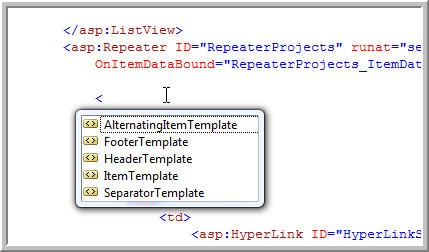
With the new ListView, you have lots more choices as follows:
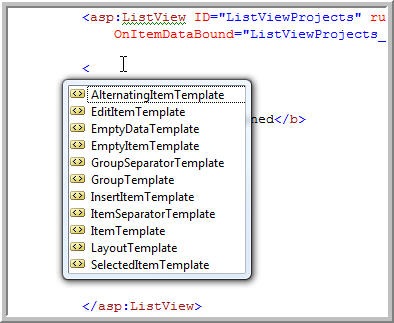
Lots of reasons to start using the ListView. Just having EditItemTemplate is enough for me.
So, the first problem is you want to grab the DataItem equivalent from ListView. That is, in the DataBind event of the repeater, you get the DataItem as follows:
protected void RepeaterProjects_ItemDataBound(object sender, RepeaterItemEventArgs e)
    {
        RepeaterItem ri = e.Item;
        if (ri.DataItem != null)
        {
            DropDownList ddl = (DropDownList) ri.FindControl("DropDownListVersions");
            Label labelVersion = (Label) ri.FindControl("LabelCurrentVersionRunning");
Now, how to you do the same thing for the ListView?
   protected void ListViewProjects_ItemDataBound(object sender, ListViewItemEventArgs e)
    {
        using (ListViewDataItem listViewDataItem = (ListViewDataItem) e.Item)
        {
            if (listViewDataItem != null)
            {
                DropDownList ddl = (DropDownList)listViewDataItem.FindControl("DropDownListVersions");
                Label labelVersion = (Label)listViewDataItem.FindControl("LabelCurrentVersionRunning");
One thing I also noticed that for the ListViewProjects_ItemDataBound to be called, I must call DataBind() on ListViewProjects. Seems Repeater calls it on every postback but I would not swear to that. One Final thing. In this process, I realized I had to create a LayoutTemplate. Very cool. I wondered why Header and Footer templates were gone.
<asp:ListView ID="ListViewProjects" runat="server" DataSourceID="SqlDataSourceWebSites"
                OnItemDataBound="ListViewProjects_ItemDataBound">
                <EmptyDataTemplate>
                    <b>Not Web Sites Defined</b>
                </EmptyDataTemplate>
                <LayoutTemplate>
                    <ul>
                        <asp:PlaceHolder ID="itemPlaceholder" runat="server" />
                    </ul>
                </LayoutTemplate>
Hope this Helps you.