
(AKA, the DataFormatString=”{0:M-dd-yyyy}” Problem)
A very common desire is to set a column of a GridView to display just the month, day and year of a DateTime type. The problem is the by default, the HtmlEncode property of the BoundField attribute ( <asp:BoundField …) is set to True. The reason for this (as pointed out in the documentation of this attribute) is that this helps prevent cross-site scripting attacks and malicious content from being displayed. Microsoft recommends that the HtmlEncode attribute be enabled whenever possible.
The problem is that if this field is enabled, you can not pass format information to the boundfield control. That is, if you try the following code, you will not get the desired result.
<columns> <asp headertext="CreationDate" dataformatstring="{0:M-dd-yyyy}" datafield="CreationDate" :BoundField /> </columns> </asp>
You have two choices to make this work as you would expect. The first choice is to simply set HtmlEncode to false as follows:
<asp id="GridView1" runat="server" :GridView> <columns> <asp headertext="CreationDate" dataformatstring="{0:M-dd-yyyy}" datafield="CreationDate" :BoundField HtmlEncode="false" /> </columns>
The second choice is to make the column a template and simply set the format string directly in the Label or Text Fields as follows.
<asp id="GridView3" runat="server" :GridView> <columns> <asp headertext="CreationDate" :TemplateField> <edititemtemplate> <asp id="Label1" runat="server" Label.Text='<%# Eval("CreationDate", "{0:M-dd-yyyy}") %>'> </asp> </edititemtemplate> <itemtemplate> <asp id="Label1" runat="server" Label.Text='<%# Bind("CreationDate", "{0:M-dd-yyyy}") %>'>; </asp> </itemtemplate> </asp> </columns> </asp>
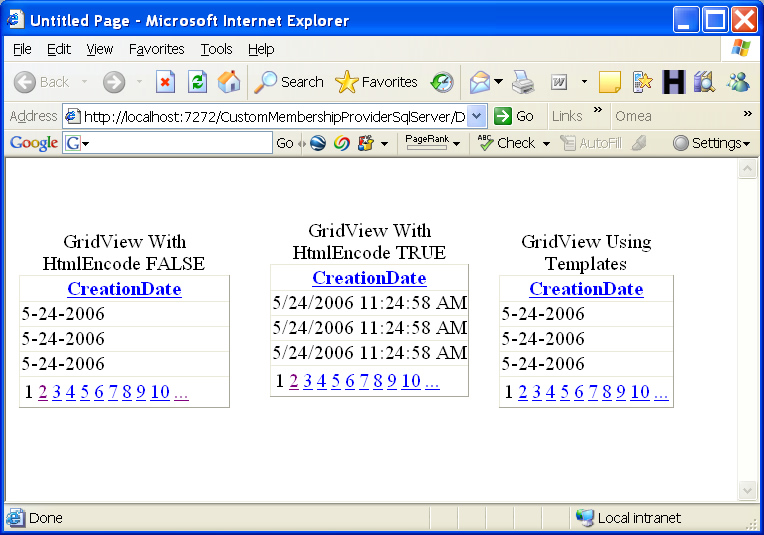
Below is a screen shot of what the three scenarios discussed above look like.
Good luck with your coding and hopefully, this will be one nasty you can put behind you.


very nice
Thanks for date format it help me a lot
Thanks. It works well.
thanks you.
Thanks men
Thanks you so much for the help
Sorry for multiple messages but I had to find a way to put the example code
And if you want the dating format to be applied during editing as well add this extra setting to the control:
ApplyFormatInEditMode=”True”
The code sample I had added to my previous message has somehow dissapeared. It was like below (I encoded it hoping it will display this time)
%3Casp%3ABoundField%20DataField%3D%22dPayment%22%20DataFormatString%3D%22%7B0%3Ad%7D%22%20HeaderText%3D%22Payment%22%20SortExpression%3D%22dPayment%22%20ApplyFormatInEditMode%3D%22True%22%20%3E
For those who are having problems with date field updates (getting incorrect string format etc error messages) I’ll suggest not using template field. Instead use boundfield such as:
Thanks for lot.. it is really useful article..
Thank you so much for example
thanks a ton!! helped in my project
Very nice initiative!
Thanks, I remember in the early days with classic ASP, using a gridview was a nightmare!
Web design is a hard lesson for me. Still need to learn more…
Definitely believe that which you stated. Your favorite justification seemed to be on the web the simplest thing to be aware of. I say to you, I definitely get annoyed while people think about worries that they plainly don’t know about. You managed to hit the nail upon the top and defined out the whole thing without having side effect , people can take a signal. Will probably be back to get more. Thanks
lead to this page with google, the gridview date format bothering me for a long time. thx 4 yr valuable share.
Peter,
Thanks for this – was driving me mad !
Rgds, Peter
thanks
Thanks a lot sir…
I was stuck at that for a long time ………….
This code works very well on my local computer. I’ve tested the entire script and seems to work fine. Thank you !
Yei! thanks
Thanks.. its works superb.
I usually format the cells in the RowDataBound in the code behind. This method seems quite easy and straight forward
Thank you
THXX A LOOTTTT!!!! >.<
i look for this since 10 hours ago.. LOL
Thanks a lot.. i got how to publish only date in grid view…
Nice and practical! But can you please illustrate formatting numbers? Like into fewer decimal places.. i tried ” and it is not resulting the expected.
Thanks Much
Thanks for great contribution, clear and concise
Thanks man…
For Null Values how can we set some default value ???
need to apply this formatting to a templatefield that is bound dynamically …any ideas? Not an option do this formatting in mark-up…needs to happen in code behind.
thanks in advance
Just what I was looking for – thank you.
Yes, learn, and very helpful.
mehrbani janab
use “{0:D}” output sample =14 Agustus 2010
I can change the DateFormatString in the BoundField Properties and my display results reflect the change.
I am not sure why you say this cannot be accomplished.
Perhaps, Microsoft corrected the issue since your post.
Additionally, I do not see how the following is permitted:
VS throws an error for this code and rightfully so.
I guess as long as we find an appropriate solution then we are happy.
Best Regards,
Richard
Thanks a lot
Its really helps to me
Thanks a lot
Its really helps to me
Happy Coding
Thanks. it’s really solve my problem.
Thanks. it’s really solve my problem & save my time.
Thanks..! Its gave a path to build stable scheduler for my client.
Thank you…really helps and saves lot of my time…..
Thanks very much for a clear explanation and an easy solution! Nicely documented and easy to follow. Your help is much appreciated!
hey many thanks !!
Thanks, was helpful.
Very good artical thanks 4 d post…
its helped me out for my work
Thanks
can somebody show me how to format it from the codebehind? thanks
Thanks for a simple answer with practical examples. Much preferred to wading through all the specific date formats in MSDN.
It did not display the code here it is one more time:
BoundField DataField=”oContactPhone” HeaderText=”Contact Phone”
ReadOnly=”True” SortExpression=”oContactPhone”
DataFormatString=”{0:(###) ###-####}”
HtmlEncode=”False”
Need help to format Phone Number.
The following code displays the phone number as 10 digits with no space.
What am I missing?
This does not work when you bind a gridview to a collection when the column is a date.
Nice tips. I twill be more helpfull to all
Thank you for this tip. It saved me some time.
thanks…………..
hi,
how can i trim string using format?
Thanks a lot!!!!!!!!!!
Its really helps to me
thanks a lot.. was searching for this so long…
thank you very much realy
Great tip ive been trying everything for the last few hours.
worked perfect for my project
but a 10 second google search saved the day cheers
it works for me .thanks
Gr8 job!!
Thank U Very Much!!
U Rock!!!!!!
This article very use full i got my desird soltion on it which i want immediatlty
Thanks
Cool.. This code Work’s Thks man..!!
Thanks your code really works very well.
patrick: if u’r using asp.net..ajax control extensions has ur answer..
http://www.asp.net/learn/ajax-videos/video-124.aspx
Thanks a lot! This is awesome.
My question is, if I want to let the user rather than change that text, but give a calendar for them to choose from. How do I do that? I tried the Calendar object, but I could not get it to work.
That is like… they have the currently chosen date in a label or textfield, then next to it a button (like with an hourglass or somethin) that when they press that, a mini calenday pops up, and they can select the date from there.
To Nic Smith:
You can format just the date with DataFormatString=”{0:hh:mm:ss tt}” Notice lowercase ‘mm’. Upper case will give months while lowercase will give minutes. It worked for me.
Hooray………………….
IT worked ………..
Thanks alot ………
U Rockzzz………….
i would say thanks for your help,
it certainly saved my time to formate the date in grid view.
cheers,
Superb man !!!!
It wrks excellent….
thnx man …
great work. solved my problem. thanks alot
thankz, i solve my problem…
hello peterkellner
thanks for your explanation.
For @Vedpathak:
How to show datetime like
DataFormatString = “{0:MM/dd/yyyy hh:mm:ss AM/PM}”
==> try for expression:
DataFormatString ={0:MM/dd/yyyy hh:mm:ss tt}
It will display hour with AM or PM
Hope to help you.
Hello Sir,
How to show datetime like
DataFormatString = “{0:MM/dd/yyyy hh:mm:ss AM/PM}”
I tried this but it doesn’t work. I have to export it to excel with AM/PM.
Thanks,
Prashant V
Absolutely perfect – wonderfully explained thanks mate
10x a lot!!!
I tried below code
“”
but didn’t work.
Table Column ‘Booking_Date’ is of ‘datatime’ type.
can anybody explain?
I tried below code
but didn’t work.
Table Column ‘Booking_Date’ is of ‘datatime’ type.
can anybody explain?
Thanks! Exactly what I need.
i just want to share with you mine experience. i tried to bind to objectdatasource where property was another custom object which implemented IFormatter. in this case you must ensure that ToString() doesnt return empty string. crazy. i found that out by dissasembling the code of BoundField. i wish i could avoid this rant but code actually looks like it was written by very junior guy..
Good article, but the HtmlEncode=”False” isn’t doing the trick for me. I’m trying to dynamically bind to a GridView with the following code:
Dim gv As New GridView()
gv.DataSource = dt
gv.AutoGenerateColumns = False
For Each col As Data.DataColumn In dt.Columns
Dim myBoundField As New BoundField()
With myBoundField
Select Case col.ColumnName
Case “DtReadingFrom”
.HeaderText = “Start Date”
.DataFormatString = “{0:MM/dd/yyyy}”
.HtmlEncode = False
Case “DtReadingTo”
.HeaderText = “End Date”
.DataFormatString = “{0:MM/dd/yyyy}”
.HtmlEncode = False
Case “TX_METER_NUMBER”
.HeaderText = “Meter #”
Case Else
.HeaderText = col.ColumnName
End Select
.DataField = col.ColumnName
.Visible = True
End With
gv.Columns.Add(myBoundField)
Next
hmmm coool
Thanks man, it worked for me too !!!
Thanks man, this is that i’m looking for.
How to do this if dynamically binding data in code behind?
Thanks for your insightful article.
Warmest Regards
how to bind in GridView custom DatePicker Control to Null Value.
Here is code.
—————————————
‘
CalendarFont-Names=”Arial” InitialText=”Select a Date” TextBoxWidth=”80″ AutoPosition=”True” CalendarOffsetX=”-200px” CalendarOffsetY=”25px” CalendarTheme=”None” CalendarWidth=”200px” CallbackEventReference=”" Culture=”Bulgarian (Bulgaria)” EnableDropShadow=”True” MaxDate=”9999-12-31″ MinDate=”" NextMonthText=”>” NoneButtonText=”None” ShowNoneButton=”True” ShowTodayButton=”True” ZIndex=”1″>
‘>
—————————————-
Vey helpful. Thanks
Great Job! thanks
Thanks so much! I was beating my head against the wall!!
Well done peter
Thanks
This worked great for display, but when trying to update it throws – System.FormatException, String was not recognized as a valid DateTime, anyone with suggestions.
Thank you so much, now I can stop having nightmares.
Thanks,Its really Useful.
Bravo, Peter, this was great help!
Merci beau coup.
nice try.
u got me out of a crappy situation
thank u!
very helpful, thankyou.
Very useful! Thank a lot!
help..HtmlEncode statement is not recognized
Great stuff, thanks.
I have GridView binding to BLL object returning ArrayList.
How can I set DataFormatString programatically using GridView’s DataBinding or DataBound event?
Desing time it works.
DataFormatString of (###) ###-#### will work with formatting phone numbers in column?
Thanks!Thanks!Thanks!Thanks!
very nice, thanks!
Thanks, it helped.
Nice, thanks
Thanks! Nice work!
Thanks very usefful code. any way to format the bind text with a custom function?
I have to join in with all the other kudo’s — this simple problem was very irritating — thanks for the complete explanation.
thanks a lot man. it was very helpful.
Helped me out, thanks.
Nice work Peter,
thanks.
It is very great it work in my project.
Thanks you very much…
fantastic ! This code work
Thanks man
Thank you!
its very very helpfull..tq for that…
What if I dynamically bind data to the gridview?
Peter,
Thanks for this – was driving me mad !
Rgds, Peter
Nice article. I like how you demonstrate in a couple different ways, cheers.
Thanks this was helpful to me.
Than You very much about your explaining. it works